
FICSMAS
| “ | You better watch out, you better not cry, you better not pout, I'm telling you why. FICSMAS is coming to town | „ |
| ~ ADA |

FICS⁕MAS is a holiday-themed seasonal event that takes place between December 1 and January 18.
Seasons
| # | Start | End | Notes |
|---|---|---|---|
| 1 | December 1, 2020 | January 18, 2021 | Introduced in Patch 0.3.7. First season, which operated differently than later seasons. See FICSMAS 2020 (Archive). |
| 2 | December 1, 2021 | January 18, 2022 | FICSMAS Calendar changed along with the daily and random gifts |
| 3 | December 1, 2022 | January 18, 2023 | No changes due to ongoing work on Update 7.[1] |
| 4 | December 1, 2023 | January 18, 2024 | No changes, other than a New FICSMAS Calendar, due to ongoing work on Update 8.[2] |
Participating
The event features:
- Giant FICSMAS Gifts, dropping from the sky
- FICSMAS Calendar, found in the HUB
- FICSMAS Holiday Event Research, found in the MAM
- FICSMAS Items
- FICSMAS Buildings
- FICSMAS Equipment
- Customizer skins
- Other festive decorations, such as on Power Poles or Lizard Doggo hats
Progression through the event is made using a MAM research chain, which in turn requires items obtained from the FICSMAS Advent Calendar. This makes multiple research steps gated behind a date.
For the entire duration of the event, Giant FICSMAS Gifts drop from the sky, which can be collected for  FICSMAS Gifts. Early into the event, these can be automated using Gift Trees, leading to entire FICSMAS production lines.
Once the event ends, Gift Trees stop producing Gifts, recipes are no longer be able to be selected in machines, and buildings disappear from the build menu. Existing items and buildings already placed remain.
Disabling the event
FICSMAS can be disabled using the "Disable Seasonal Events" option. This option is only available on the title screen, under Options > Gameplay > Disable Seasonal Events.
In multiplayer, the host's configuration is used. If the host has seasonal events enabled, but the client does not, FICSMAS will be enabled in the session.
Alternatively, seasonal events can be disabled using the -DisableSeasonalEvents launch argument. On a dedicated server, this launch argument is the only way to disable seasonal events.
Giant FICSMAS Gifts
Giant FICSMAS Gifts appear from the sky at random intervals. This only happens within 300 meters of each player, and until there are 15 gifts. They fall slowly with parachutes and will land on the first solid object in contact, shaking the screen and with a pop effect.
They can be interacted E with to collect 5–40 FICSMAS Gifts. If they are hard to access such as on top of a tree or a cliff, using Ladders is one of the easiest methods. The gift's size ranges between 4 × 4 × 3 m to 12 × 12 × 7 m and corresponds to the amount of FICSMAS Gifts.
Giant Gifts have a collision box that affects vehicles, and can prevent factory construction.
When picking up a Giant Gift, there is a small chance that ADA will say one of the following lines:
- "Merry Christmas"
- "Ho ho ho, Merry Christmas"
- "Happy holidays. Now get back to work"
- "Here's a present. It's Iron bars"
- "Merry Christmas you filthy animal"
Giant FICSMAS Gifts are not saved along the session data (they are not included in the save file).
FICSMAS Gift production can be automated using FICSMAS Gift Trees.
FICSMAS Calendar
A Satisfactory-themed advent calendar can be found to the right of the HUB Terminal. Each day from December 1 to December 25, a reward can be collected from the calendar. Rewards from previous days can be collected as well, until the event ends, at which point will any unclaimed rewards vanish.
Rewards can be collected by interacting E with the calendar. To claim a reward, its corresponding number has to be clicked. Each number is hidden in the poster. If you can't find a certain number, you can 'get a hint' by entering the number into the field in the bottom right, highlighting that number. When a reward is claimed, its number changes to bright white.
Three total poster images were used: the first in 2020, second in 2021 & 2022, and third in 2023.
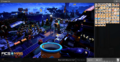
FICSMAS Advent Calendar 2020
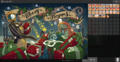
FICSMAS Advent Calendar 2021 & 2022
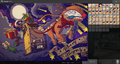
FICSMAS Advent Calendar 2023


Rewards
Rewards on the 1st, 3rd, 4th, 5th, 10th, 11th, 24th, and 25th of December are fixed. Rewards on other dates are in a random order, which seemingly randomizes each time the session is reloaded. No matter the order, all rewards listed below can be claimed by the 25th.
| Day | Reward |
|---|---|
| 1st | 100 × FICSMAS Gifts
|
| 3rd | 1 ×  Red FICSMAS Ornament Red FICSMAS Ornament
|
| 4th | 1 ×  FICSMAS Ornament Bundle FICSMAS Ornament Bundle
|
| 5th | Customizer: Basic FICSMAS Skins for Conveyor Belts and Pipelines. |
| 10th | 1 ×  FICSMAS Wonder Star FICSMAS Wonder Star
|
| 11th | Customizer: Premium FICSMAS Skins for Factory Carts, Trucks and Drones |
| 24th | Finger Guns Emote |
| 25th |  Sweet Fireworks, Sweet Fireworks,  Fancy Fireworks, Fancy Fireworks,  Sparkly Fireworks Sparkly Fireworks
|
| Gifts | Notes |
|---|---|
| 100 × FICSMAS Gift
|
FICSMAS items |
25 ×  Copper FICSMAS Ornament Copper FICSMAS Ornament
| |
25 ×  Iron FICSMAS Ornament Iron FICSMAS Ornament
| |
10 ×  FICSMAS Decoration FICSMAS Decoration
| |
25 ×  FICSMAS Bow FICSMAS Bow
| |
30 ×  FICSMAS Tree Branch FICSMAS Tree Branch
| |
20 ×  Candy Cane Candy Cane
| |
50 ×  Actual Snow Actual Snow
| |
50 ×  Snowball Snowball
| |
10 ×  Medicinal Inhaler Medicinal Inhaler
|
Standard items |
20 ×  Power Shard Power Shard
| |
1 ×  Coal Coal
| |
200 ×  Color Cartridge Color Cartridge
| |
5 ×  FICSIT Coupon FICSIT Coupon
| |
| 25 × FICSIT Coupon
| |
7 ×  Superposition Oscillator Superposition Oscillator
|
Available exclusively through the calendar |
2 ×  Quantum Computer Quantum Computer
|
MAM Research
Progression through the event is done via a 'FICSMAS Holiday Event' Research Tree in the MAM.

| # | Research | Cost | Time | Rewards |
|---|---|---|---|---|
| 1 |  FICSMAS Tree Base FICSMAS Tree Base[note 1] |
100 × FICSMAS Gift |
0:03 | Building:  Giant FICSMAS Tree Giant FICSMAS TreeCrafting: FICSMAS Tree Branch out of FICSMAS Gift |
| 2 |  Candy Cane Basher Candy Cane Basher |
50 × FICSMAS Tree Branch |
0:03 | Crafting:  Candy Cane Basher Candy Cane BasherCrafting: Candy Cane out of FICSMAS Gift |
| 3 |  Candy Cane Decor Candy Cane Decor |
10 × Candy Cane |
0:03 | Building:  Candy Cane Candy CaneCrafting: FICSMAS Bow out of FICSMAS Gift |
| 4 |  Giant FICSMAS Tree: Upgrade 1 Giant FICSMAS Tree: Upgrade 1[note 2] |
1 × Red FICSMAS Ornament |
0:03 | Crafting: Red FICSMAS Ornament Crafting:  Blue FICSMAS Ornament Blue FICSMAS OrnamentGiant Tree Upgrade: Candy Canes |
| 20 × Candy Cane | ||||
| 30 × FICSMAS Bow | ||||
| 5 |  A Friend A Friend |
50 × Candy Cane |
0:03 | Building:  Snowman SnowmanCrafting: Actual Snow |
| 50 × FICSMAS Bow | ||||
| 6 |  FICSMAS Gift Tree FICSMAS Gift Tree |
50 × Red FICSMAS Ornament |
0:03 | Building:  FICSMAS Gift Tree FICSMAS Gift TreeCrafting: Copper FICSMAS OrnamentCrafting: Iron FICSMAS Ornament |
| 50 × Blue FICSMAS Ornament | ||||
| 50 × FICSMAS Tree Branch | ||||
| 7 |  Giant FICSMAS Tree: Upgrade 2 Giant FICSMAS Tree: Upgrade 2[note 3] |
1 × FICSMAS Ornament Bundle |
0:03 | Giant Tree Upgrade: FICSMAS Light, Red, Blue and Copper Ornaments |
| 200 × Copper FICSMAS Ornament | ||||
| 200 × Iron FICSMAS Ornament | ||||
| 8 |  FICSMAS Lights FICSMAS Lights |
100 × Red FICSMAS Ornament |
0:03 | Building:  FICSMAS Power Light FICSMAS Power LightCrafting: FICSMAS Ornament Bundle |
| 100 × Blue FICSMAS Ornament | ||||
| 50 × Copper FICSMAS Ornament | ||||
| 50 × Iron FICSMAS Ornament | ||||
| 9 |  It's Snowing! It's Snowing! |
10 × FICSMAS Ornament Bundle |
0:03 | Building:  FICSMAS Snow Dispenser FICSMAS Snow DispenserCrafting: FICSMAS Decoration |
| 100 × Actual Snow | ||||
| 500 × FICSMAS Tree Branch | ||||
| 10 |  Giant FICSMAS Tree: Upgrade 3 Giant FICSMAS Tree: Upgrade 3[note 4] |
1 × FICSMAS Wonder Star |
0:03 | Giant Tree Upgrade: Iron Ornaments, Colored Gifts |
| 200 × FICSMAS Decoration | ||||
| 400 × FICSMAS Ornament Bundle | ||||
| 11 |  FICSMAS Wreath FICSMAS Wreath |
100 × FICSMAS Decoration |
0:03 | Building:  FICSMAS Wreath FICSMAS WreathCrafting: FICSMAS Wonder Star |
| 200 × FICSMAS Ornament Bundle | ||||
| 500 × FICSMAS Bow | ||||
| 12 |  Snowfight! Snowfight! |
500 × Actual Snow |
0:03 | Crafting:  Snowball Pile [note 5] Snowball Pile [note 5]Crafting: Snowball |
| 500 × Candy Cane | ||||
| 500 × FICSMAS Bow | ||||
| 13 | Giant FICSMAS Tree: Upgrade 4 |
500 × FICSMAS Wonder Star |
0:03 | Giant Tree Upgrade: A Star as a tree-topper |
The entire research tree requires only Tier 3 tech - only Constructors, Assemblers, Smelters and Foundries are required to automate all the FICSMAS items (they cannot be crafted at Craft Bench). Progression through the research chain is gated using key items obtained from the FICSMAS Calendar. For example, the first key item, a Red FICSMAS Ornament, becomes available on December 3rd.
Notes:
- ↑ Use FICSMAS Gift from Giant FICSMAS Gifts to unlock Node 1
- ↑ Use Red FICSMAS Ornament Gift from December 3rd to unlock Node 4
- ↑ Use FICSMAS Ornament Bundle Gift from December 4th to unlock Node 7
- ↑ Use FICSMAS Wonder Star Gift from December 10th to unlock Node 10
- ↑ Patch 0.5.1.3 Removed "Snow Mittens" Recipe and ability to make "Snowball Pile" Equipment for FICSMAS 2021
Items
Equipment
Buildings
Customizer skins
- Basic FICSMAS Skins consume one FICSMAS Gift on use, with different styles depending on the mark:
- Conveyor Belt - Mk 1 - Brown FICS⁕MAS Paper with Tape.
- Conveyor Belt - Mk 2 - Grey with White Snowflakes.
- Conveyor Belt - MK 3 - Red/Green/White Striped Brown Wrapping Paper.
- Conveyor Belt - Mk 4 - Dark Green with White FICS⁕MAS Trees.
- Conveyor Belt - Mk 5 - Grey with Gold Stars.
- Pipeline - Mk 1 - White with Red Stripes Candy Cane.
- Pipeline - Mk 2 - White with Red Stripes Candy Cane Plus Green Highlights.
- Premium FICSMAS Skins consume one FICSMAS Wonder Star on use:
- Standard Factory Cart - Red Christmas Wrapping with White Stars and Candy Cane Piping with Green Highlight on left side along with additional various Gold Metal Body Trimmings.
- Truck - Chocolate body, chocolate wheels along with Gingerbread body parts all accented with White / Pink Frosting and Red / Green Candies.
- Drone - White body with Red / Green / Gold Highlights. Red Christmas Wrapping with White Stars is used around fan blades and in a strip across body. Green Wrapping with White Stars plus White Zig-Zags is used in a strip across the body.
- Premium FICSMAS Skins are not available for the Golden Factory Cart, Tractor, and Explorer.
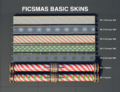
Customizer FICSMAS Basic Skins. Introduced in 2021 FICSMAS on Day 5.
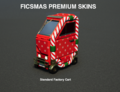
Customizer FICSMAS Premium Skin for Standard Factory Cart. Introduced in 2021 FICSMAS on Day 11.
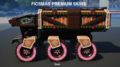
Customizer FICSMAS Premium Skin for Truck. Introduced in 2021 FICSMAS on Day 11.
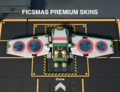
Customizer FICSMAS Premium Skin for Drone. Introduced in 2021 FICSMAS on Day 11.


Seasonal differences
- The top three screens inside of The HUB change to display a FICSMAS banner. A FICSMAS Calendar is added beside the HUB Terminal. The rocket on the Launch Pod button is changed into a gift-filled sleigh.
- The Coupon icon on the AWESOME Shop takes on a new festive appearance, and the spinning CheckIt mascot on the top donns a hat.
- Power Pole variants have wreaths attached.
- Lizard Doggos have a red nose and antlers.
- Jump Pads play Jingle Bells when used in succession.
- Packagers spray gift boxes, candy cane, ring, and sparkle particles instead of their usual fluid droplets while operating.
- Factory Carts take on a red-and-white snowflake pattern gift wrap color scheme, and their sirens are replaced with festive music.
- Pioneers are given a Santa hat, which is visible in multiplayer, or when driving a vehicle or flying in a Hypertube
Trivia
- Dylan made the snowballs and Tree.[3][4]
- When opening the daily reward from the Advent calendar, there was a small chance for the small door to swing downward instead of sliding down.
- The FICSMAS Calendars were made by CSS Art Director, Torsten Gunst, and CSS UI Graphics Designer, Pontus Lundén, whom made the Advent Calendar UI.[5]
History
- Patch 0.8.2.8 thru Patch 0.8.3.2: Undocumented Change - FICSMAS issues[2][6] related to Unreal Engine 5 fixed. New FICSMAS Calendar released.
- Patch 0.7.1.1: Fixed being unable to upgrade FICSMAS Power Lights
- Patch 0.6.0.4
- Fixed FICSMAS Snowballs missing their magazine when equipped
- Fixed Snowball explosions not blowing up foliage or destructible rocks
- Patch 0.5.1.5: Some minor FICS*MAS related bug fixes
- Patch 0.5.1.4
- Fixed M.A.M. research tree “FICS*MAS Holiday Event” not unlocking in some scenarios
- Fixed game breaking typo on the FICS*MAS Calendar UI
- Added a launch option that Disables FICS*MAS and any other Seasonal Events
-DisableSeasonalEvents(This does the same thing as ticking "Disable Seasonal Events" in the main menu orFG.DisableSeasonalEvents 1in console)
- Patch 0.5.1.3
- FICS*MAS is officially back!
- Check the FICS*MAS Calendar and the M.A.M. research tree “FICS*MAS Holiday Event” to get started
- Removed “Snow Mittens” Recipe and ability to make “Snowball Pile” Equipment
- FICSMAS "Snowball" is now considered alternative Nobelisk Ammo. Equip the Nobelisk Detonator and press G key to Switch Ammo types
- FICS*MAS is officially back!
- Patch 0.5.0.6: Fixed Nobelisk/Snowballs on Dedicated servers
- Patch 0.3.7.7
- FICS*MAS related items can now be sunk into the AWESOME Sink
- All dates in the calendar can now be properly opened
- Patch 0.3.7.6: Fixed FICSMAS ending prematurely on Dec 31, however, rewards from the calendar cannot be collected properly (e.g. on Jan 2, only rewards from days one and two are available)
- Patch 0.3.7.5: Changed Dec 25 reward from one Biomass to one Fused Modular Frame
- Patch 0.3.7.4
- Buildings that are not in the Build Menu are no longer able to be sampled (This will affect the FICSMAS related buildings once the event is over)
- Fixed text inconsistencies between Snowball Pile and Snowball Mittens
- Patch 0.3.7.3
- Calendar unlocks now use local time instead of UTC, this should help those who stay up until midnight to catch Santa delivering your presents
- Updated all languages with the latest translations, A lot of FICS*MAS related content has now been translated
- Patch 0.3.7.2
- Power Lines can now be upgraded to FICSMAS Power Lights and vice versa
- Assorted FICSMAS related text fixes
- Patch 0.3.7.1
- Cosmetic and Audio related FICSMAS fixes
- Vehicles can now go through FICSMAS gifts
- Patch 0.3.7: Introduced
References
- ↑ YouTube - FICS*MAS 2022 Release Date and Other Info
- ↑ 2.0 2.1 YouTube - Update 8 Known Issues and State of FICSMAS
- ↑ Satisfactory Wiki - December 15th, 2020 Livestream - Citation: Dylan made the snowballs
- ↑ YouTube - December 15th, 2020 Livestream - Community Highlights
- ↑ YouTube - December 5, 2023 Livestream on Twitch - Q&A: Who is the artist for the new FICSMAS calendar?
- ↑ YouTube - November 7th, 2023 Livestream on Twitch - State of Dev
| ||||||||||||||||||||||||||||||||