Save files are files that contain the .sav file extension.
Save file location
Both Steam and Epic Games use the same path:
- Windows
%LOCALAPPDATA%\FactoryGame\Saved\SaveGames\{YOUR ID}C:\Users\<your Windows username>\AppData\Local\FactoryGame\Saved\SaveGames\{YOUR ID}
- If you cannot find your Steam save folder (such as due to purchasing the game on Steam after previously owning on Epic), first start a new game with Steam, then save the new game. You should now be able to see your Steam save folder beside epic. The Steam ID is usually shorter than the Epic ID. The folder location is stated above.
- Linux
- Using Steam Play:
~/.local/share/Steam/steamapps/compatdata/526870/pfx/drive_c/users/steamuser/Local Settings/Application Data/FactoryGame/Saved/SaveGames/{YOUR STEAM ID}
- Steam:
~/.var/app/com.valvesoftware.Steam/.local/share/Steam/steamapps/compatdata/526870/pfx/drive_c/users/steamuser/AppData/Local/FactoryGame/Saved/SaveGames/{YOUR STEAM ID}
- Steam (installation on another drive than your home dir):
{YOUR DRIVE}/SteamLibrary/steamapps/compatdata/526870/pfx/drive_c/users/steamuser/AppData/Local/FactoryGame/Saved/SaveGames/{YOUR STEAM ID}
Automatic backup
When a save file is saved by overwriting another, the game creates a backup of the previous save file. This doesn't happen when an autosave occurs, unless you manually overwrite it.
Both Steam and Epic Games use the same path:
- Windows
%LOCALAPPDATA%\FactoryGame\Saved\SaveGames\SaveGames_backupC:\Users\<your Windows username>\AppData\Local\FactoryGame\Saved\SaveGames\SaveGames_backup
- If you cannot find your steam save folder (probably because you have owned the game in Epic and just bought the Steam copy recently), first start a new game with Steam, then save the new game. You should now be able to see your steam save folder beside epic. The steam ID is usually shorter than the Epic ID. The folder location is stated above.
- Linux
- Using Steam Play:
~/.local/share/Steam/steamapps/compatdata/526870/pfx/drive_c/users/steamuser/Local Settings/Application Data/FactoryGame/Saved/SaveGames/SaveGames_backup
- Steam:
~/.var/app/com.valvesoftware.Steam/.local/share/Steam/steamapps/compatdata/526870/pfx/drive_c/users/steamuser/AppData/Local/FactoryGame/Saved/SaveGames/SaveGames_backup
- Steam (installation on another drive than your home dir):
{YOUR DRIVE}/SteamLibrary/steamapps/compatdata/526870/pfx/drive_c/users/steamuser/AppData/Local/FactoryGame/Saved/SaveGames/SaveGames_backup
Save editing
Save files can be edited using online tools such as Satisfactory Interactive Map. See here.
Cloud sync
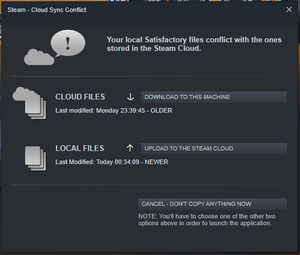
Example of a sync conflict dialog on Steam
If playing on Epic Games or Steam and Cloud Sync is enabled, a notification may sometimes appear when the player:
- Switches the game version between experimental and stable
- Copies over the save game across different platforms
- Continues a game at different machine
And you will be prompted to either upload your save file to the cloud or download the save file from the cloud to your PC.
Unless you are playing across multiple PC, always choose upload your save file to the cloud to avoid losing your progress. And always back up your saves!
Save file format
A save file has a header and a body. The body of the file is compressed in chunks.
As of Patch 0.6.1.3 (Early Access Build 202470, released on September 28, 2022), the produced save file header has version 10, the save version is 30 and the editor object version is 40. For these versions, this format description should be correct, but may not be complete: It is possible that not all potential structures were present in the analyzed save files.
Basic data types
There are five basic types that are used to compose more elaborated structures in the save files:
Byte
A single 8-bit byte that represents a signed integer between -128 and 127.
Int
Four consecutive bytes in little-endian order that represent a signed integer between -2,147,483,648 and 2,147,483,647.
Long
Eight consecutive bytes in little-endian order that represent a signed integer between -9,223,372,036,854,775,808 and 9,223,372,036,854,775,807.
Float
Four consecutive bytes in little-endian order that represent a signed floating-point number with single precision, according to the binary32 format of IEEE 754.
String
A variable-length byte sequence of UTF-encoded characters, null-terminated:
| number of bytes
|
description
|
example
|
notes
|
| 4
|
string length in bytes, including null-termination bytes
|
22
|
as an Int, see above
|
| variable
|
the encoded characters
|
"Hello Massage-2(A-B)b"
|
without the quotation marks
|
| 1 or 2
|
null-termination
|
N/A
|
one byte if UTF-8, two bytes if UTF-16
|
A length of zero represents the empty string and occupies just these four bytes. A positve length means that the characters are encoded in UTF-8. A negative length means that the characters are encoded in UTF-16 little-endian, without a byte-order mark. In this case, the given negative length has to be multiplied by minus two to get the number of bytes the rest of the string occupies (including the two bytes for null-termination).
Composite data types
Using the basic data types defined above, a save file has two top-level structures: a SaveFileHeader and a SaveFileBody. These are composed of different intermediate data types themselves.
These composite data types are documented below. A data type is a list of ordered fields, each field is a row in the table of the data type. So, for example: The SaveFileHeader begins with an Int (four bytes) that represents the save header version. This is followed by another Int (the next four bytes) that represents the save version and so on.
| basic data type
|
description
|
example
|
notes
|
| Int
|
save header version
|
10
|
for a version list see the header SaveCustomVersion.h in the Community resources
|
| Int
|
save version
|
30
|
for a version list see the header FGSaveManagerInterface.h in the Community resources
|
| Int
|
build version
|
202,470
|
this is Patch 0.6.1.3
|
| String
|
map name
|
"Persistent_Level"
|
|
| String
|
map options
|
"?startloc=Rocky Desert?sessionName=only one way to find out?Visibility=SV_Private"
|
|
| String
|
session name
|
"only one way to find out"
|
|
| Int
|
played seconds
|
941,514
|
|
| Long
|
save timestamp as Ticks
|
637,894,867,432,920,000
|
this is 2022-05-30 05:52:23 UTC
|
| Byte
|
session visibility
|
0
|
this is "private" visibility, 1 would be "friends only"
|
| Int
|
editor object version
|
40
|
depends on the unreal engine version used
|
| String
|
mod metadata
|
""
|
empty if no mods where used
|
| Int
|
mod flags
|
0
|
zero if no mods where used
|
| String
|
save identifier
|
_tYytyulUk6z2Ah42xvScg
|
a unique identifier (GUID) for this save, for analytics purposes
|
CompressedSaveFileBody
Directly after the save file header, the save file body begins with a list of zlib-compressed chunks. Each compressed chunk has this format:
| basic data type
|
description
|
example
|
notes
|
| Int
|
unreal engine package signature
|
2,653,586,369
|
always the magic number "9E2A83C1" in hex (not really an Int as defined above, more like a four byte unsigned integer)
|
| Int
|
padding
|
0
|
|
| Int
|
maximum chunk size
|
131,072
|
in number of bytes, always 128 * 1,024
|
| Int
|
padding
|
0
|
|
| Int
|
compressed size
|
3,814
|
in number of bytes
|
| Int
|
padding
|
0
|
|
| Int
|
uncompressed size
|
131,072
|
in number of bytes
|
| Int
|
padding
|
0
|
|
| Int
|
compressed size
|
3,814
|
this is a repeat of the above data
|
| Int
|
padding
|
0
|
|
| Int
|
uncompressed size
|
131,072
|
this is a repeat of the above data
|
| Int
|
padding
|
0
|
|
| N/A
|
compressed bytes of the chunk
|
N/A
|
number of bytes: see "compressed size" above
|
SaveFileBody
The save file body is the concatenation of the uncompressed chunks. The body mainly consists of a list of sublevels and the persistent level.
| basic data type
|
description
|
example
|
notes
|
| Int
|
uncompressed size
|
90,103,391
|
in number of bytes, for the whole body
|
| Int
|
sublevel count
|
107
|
the number of sublevels that follow - does not include the persistent level
|
| N/A
|
levels
|
N/A
|
sublevels and the persistent level. There is one more level than the sublevel count above, the last entry being the persistent level (See SCIM). For the format of one Level, see below
|
| Int
|
object references count
|
218
|
the count of some old object references, can be ignored according to SCIM
|
| N/A
|
object references
|
N/A
|
a list of object references, can also be ignored. for the format of one such ObjectReference, see below
|
Level
Each level has a list of game objects (actors and components), preceded by a list of headers for these objects.
| basic data type
|
description
|
example
|
notes
|
| String
|
sublevel name
|
"Level /Game/FactoryGame/Map/GameLevel01/Cave_X3_Y4_DesertCanyon_1_01.Cave_X3_Y4_DesertCanyon_1_01:PersistentLevel"
|
the name of the sublevel. if this is the persistent level, the field is absent
|
| Int
|
object header and collectables size
|
21,499,825
|
in number of bytes
|
| Int
|
object header count
|
86,644
|
the number of headers that follow
|
| N/A
|
object headers
|
N/A
|
for the format of one ObjectHeader, see below
|
| Int
|
collectables count
|
223
|
the number of collectable objects that follow (e.g. Power Slugs)
|
| N/A
|
collectables
|
N/A
|
a list of object references, for the format of one such ObjectReference, see below
|
| Int
|
objects size
|
92,259
|
in number of bytes, for all game objects in that level (actors and components)
|
| Int
|
object count
|
504
|
should be the same as the number of object headers above
|
| N/A
|
objects
|
N/A
|
the additional data for each of the object headers above. for the format of objects, see below (ActorObject or ComponentObject, depending on the header type the object belongs to)
|
| Int
|
second collectables count
|
223
|
the number of collectables in the second list that follows. can be igonred, since the collectables should be exactly the same as above
|
| N/A
|
second collectables
|
N/A
|
a list of object references, for the format of one such ObjectReference, see below. can also be ignored
|
| basic data type
|
description
|
example
|
notes
|
| Int
|
header type
|
1
|
this is a header for an actor object, 0 would be a component header
|
| N/A
|
the bytes of the header
|
N/A
|
either an ActorHeader or a ComponentHeader, see below
|
| basic data type
|
description
|
example
|
notes
|
| String
|
type path
|
"/Game/FactoryGame/Buildable/Factory/ConstructorMk1/Build_ConstructorMk1.Build_ConstructorMk1_C"
|
the type of actor, described in a hierarchical path
|
| String
|
root object
|
"Persistent_Level"
|
|
| String
|
instance name
|
"Persistent_Level:PersistentLevel.Build_ConstructorMk1_C_2147169479"
|
the name of this single actor object
|
| Int
|
need transform?
|
1
|
seems to be more like a boolean flag, semantics unclear
|
| Float
|
rotation x
|
-0.0
|
|
| Float
|
rotation y
|
0.0
|
|
| Float
|
rotation z
|
-0.99999994
|
|
| Float
|
rotation w
|
3.5762787E-7
|
|
| Float
|
position x
|
-165,200.0
|
|
| Float
|
position y
|
-33,599.996
|
|
| Float
|
position z
|
-450.0
|
|
| Float
|
scale x
|
1.0
|
|
| Float
|
scale y
|
1.0
|
|
| Float
|
scale z
|
1.0
|
|
| Int
|
was placed in level?
|
0
|
seems to be more like a boolean flag, semantics unclear
|
| basic data type
|
description
|
example
|
notes
|
| String
|
type path
|
"/Script/FactoryGame.FGPowerCircuit"
|
the type of component, described in a hierarchical path
|
| String
|
root object
|
"Persistent_Level"
|
|
| String
|
instance name
|
"Persistent_Level:PersistentLevel.CircuitSubsystem.FGPowerCircuit_2147177256"
|
the name of this single component object
|
| String
|
parent actor name
|
"Persistent_Level:PersistentLevel.CircuitSubsystem"
|
a reference to the instance name of an actor
|
ActorObject
| basic data type
|
description
|
example
|
notes
|
| Int
|
size
|
2,333
|
the number of bytes this ActorObject has, including trailing bytes
|
| String
|
parent object root
|
"Persistent_Level"
|
|
| String
|
parent object name
|
"Persistent_Level:PersistentLevel.BuildableSubsystem"
|
|
| Int
|
component count
|
8
|
the number of components this actor has (e.g. a Constructor has an input inventory)
|
| N/A
|
components
|
N/A
|
a list of object references, for the format of one such ObjectReference, see below
|
| N/A
|
properties
|
N/A
|
a list of properties, see PropertyList below
|
| N/A
|
trailing bytes
|
N/A
|
some actors have trailing bytes that contain additional information or are just padding zeros. for interpreting this data, see existing save file parsers like SCIM
|
ComponentObject
| basic data type
|
description
|
example
|
notes
|
| Int
|
size
|
194,584
|
the number of bytes this ComponentObject has, including trailing bytes. Some components only have their header information, so this size could be zero
|
| N/A
|
properties
|
N/A
|
a list of properties, see PropertyList below
|
| N/A
|
trailing bytes
|
N/A
|
some components have trailing bytes that contain additional information or are just padding zeros. for interpreting this data, see existing save file parsers like SCIM
|
ObjectReference
| basic data type
|
description
|
example
|
notes
|
| String
|
level name
|
"Persistent_Level"
|
|
| String
|
path name
|
"Persistent_Level:PersistentLevel.Build_WorkBench_C_2146781450.FGFactoryLegs"
|
|
Properties
Properties contain very different types of information. Every property has a name, which has the basic data type String.
PropertyList
Zero, one or multiple properties concatenated form a PropertyList. The special property named "None" marks the end of a PropertyList. All other properties in a PropertyList also have a type, which has the basic data type String. After the "name" and the "type" strings, the type-specific part begins. For these, see the following "...Property" descriptions.
ArrayProperty
| basic data type
|
description
|
example
|
notes
|
| Int
|
size
|
112
|
the number of bytes this property has, starting after the first padding
|
| Int
|
index
|
0
|
|
| String
|
type
|
"ObjectProperty"
|
the type of the elements in this array
|
| Byte
|
padding
|
0
|
always zero, as all padding should be
|
| Int
|
length
|
1
|
the number of elements in this array
|
| N/A
|
array elements
|
N/A
|
a list of values, according to the stated element type and number of elements. although the types are named like the other "...Property" structures here, most are actually simpler:
- "ByteProperty": a single Byte per element
- "EnumProperty" or "StrProperty": a single String per element
- "InterfaceProperty" or "ObjectProperty": two Strings per element, "level name" and "path name"
- "IntProperty": a single Int per element
- "Int64Property": a single Long per element
- "StructProperty" as element type in this context has more fields per element:
| basic data type
|
description
|
example
|
notes
|
| String
|
name
|
"mStops"
|
|
| String
|
type
|
"StructProperty"
|
seems to be always this value
|
| Int
|
size
|
1234
|
the combined size of all StructProperty elements in the array, starting after the "UUID" and the one byte padding below
|
| Int
|
padding
|
0
|
|
| String
|
element type
|
"TimeTableStop"
|
the type of elements in the payload of these StructProperty array elements
|
| Int
|
?
|
N/A
|
"UUID": most of the time, these four Ints are zeros like in a padding - but sometimes they are not. semantics unclear, could be some sort of UUID
|
| Int
|
?
|
N/A
|
| Int
|
?
|
N/A
|
| Int
|
?
|
N/A
|
| Byte
|
padding
|
0
|
|
| N/A
|
typed data
|
N/A
|
the list of elements with the actual payload of the property, see "TypedData" below for one such element
|
|
BoolProperty
| basic data type
|
description
|
example
|
notes
|
| Int
|
padding
|
0
|
|
| Int
|
index
|
0
|
seems to always be zero
|
| Byte
|
the boolean value
|
1
|
zero is considered "false", everything else is "true"
|
| Byte
|
padding
|
0
|
|
ByteProperty
| basic data type
|
description
|
example
|
notes
|
| Int
|
size
|
17
|
the number of bytes this property has, starting after the padding
|
| Int
|
index
|
0
|
seems to always be zero
|
| String
|
type
|
"EGamePhase"
|
semantics unclear, why is it not just a byte?
|
| Byte
|
padding
|
0
|
|
| Byte or String
|
the byte value
|
"EGP_LateGame"
|
the actual value of this property. if type is "None", then its just a Byte, otherwise a String
|
EnumProperty
| basic data type
|
description
|
example
|
notes
|
| Int
|
size
|
34
|
the number of bytes this property has, starting after the padding
|
| Int
|
index
|
0
|
seems to always be zero
|
| String
|
type
|
"EIntroTutorialSteps"
|
semantics unclear
|
| Byte
|
padding
|
0
|
|
| String
|
the enum value
|
"EIntroTutorialSteps::ITS_DONE"
|
the actual value of this property
|
FloatProperty
| basic data type
|
description
|
example
|
notes
|
| Int
|
size
|
4
|
the number of bytes this property has, starting after the padding
|
| Int
|
index
|
0
|
seems to always be zero
|
| Byte
|
padding
|
0
|
|
| Float
|
the float value
|
0.37677494
|
the actual value of this property
|
IntProperty
| basic data type
|
description
|
example
|
notes
|
| Int
|
size
|
4
|
the number of bytes this property has, starting after the padding
|
| Int
|
index
|
0
|
seems to always be zero
|
| Byte
|
padding
|
0
|
|
| Int
|
the int value
|
10
|
the actual value of this property
|
Int8Property
| basic data type
|
description
|
example
|
notes
|
| Int |
size |
4 |
the number of bytes this property has, starting after the padding
|
| Int |
index |
0 |
seems to always be zero
|
| Byte |
padding |
0 |
|
| Byte |
the int8 value |
4 |
the actual value of this property
|
Int64Property
| basic data type
|
description
|
example
|
notes
|
| Int
|
size
|
8
|
the number of bytes this property has, starting after the padding
|
| Int
|
index
|
0
|
seems to always be zero
|
| Byte
|
padding
|
0
|
|
| Long
|
the long value
|
2,830,424,080
|
the actual value of this property
|
MapProperty
| basic data type
|
description
|
example
|
notes
|
| Int
|
size
|
370
|
the number of bytes this property has, starting after the padding
|
| Int
|
index
|
0
|
seems to always be zero
|
| String
|
key type
|
"ObjectProperty"
|
the type the keys of this map have
|
| String
|
value type
|
"IntProperty"
|
the type the values of this map have
|
| Byte
|
padding
|
0
|
|
| Int
|
mode type
|
0
|
semantics unclear, seems to be always 0, but does not seem to be a simple padding
|
| Int
|
number of elements
|
4
|
the number of key-value pairs in this map
|
| N/A
|
map elements
|
N/A
|
a list of key-value pairs, according to the stated types and number of pairs. although the types are named like the other "...Property" structures here, they are actually simpler:
- the key types seem to always be one of these:
- "ObjectProperty": 2 strings, "level name" and "path name" per key-value pair
- "IntProperty": a single int per key-value pair
- "EnumProperty": a single string per key-value pair
- the value types seem to always be one of these:
- "ByteProperty": a single Byte per key-value pair
- "IntProperty": a single Int per key-value pair
- "StructProperty": a list of properties per key-value pair, see "PropertyList" above for one of this list
|
NameProperty
| basic data type
|
description
|
example
|
notes
|
| Int
|
size
|
17
|
the number of bytes this property has, starting after the padding
|
| Int
|
index
|
0
|
seems to always be zero
|
| Byte
|
padding
|
0
|
|
| String
|
the string value
|
"Rocky Desert"
|
the actual value of this property
|
ObjectProperty
| basic data type
|
description
|
example
|
notes
|
| Int
|
size
|
104
|
the number of bytes this property has, starting after the padding
|
| Int
|
index
|
0
|
seems to always be zero
|
| Byte
|
padding
|
0
|
|
| String
|
level name
|
"Persistent_Level"
|
|
| String
|
path name
|
"Persistent_Level:PersistentLevel.BP_FreightWagon_C_2147208516.StorageInventory"
|
|
SetProperty
| basic data type
|
description
|
example
|
notes
|
| Int
|
size
|
5,240
|
the number of bytes this property has, starting after the first padding
|
| Int
|
index
|
0
|
seems to always be zero
|
| String
|
type
|
"StructProperty"
|
the type of the elements in this set
|
| Byte
|
padding
|
0
|
|
| Int
|
padding
|
0
|
|
| Int
|
length
|
436
|
the number of elements in this set
|
| N/A
|
set elements
|
N/A
|
a list of values, according to the stated element type and number of elements. e.g. for the "mRemovalLocations" property of "/Script/FactoryGame.FGFoliageRemoval", each removal location element is of type "StructProperty". The actual location element is simpler than the StructProperty described below, since a location is just x/y/z, each of basic data type Float.
|
StrProperty
| basic data type
|
description
|
example
|
notes
|
| Int
|
size
|
9
|
the number of bytes this property has, starting after the padding
|
| Int
|
index
|
0
|
seems to always be zero
|
| Byte
|
padding
|
0
|
|
| String
|
the string value
|
"Name"
|
the actual value of this property
|
StructProperty
| basic data type
|
description
|
example
|
notes
|
| Int
|
size
|
387
|
the number of bytes this property has, starting after the padding
|
| Int
|
index
|
0
|
seems to always be zero
|
| String
|
type
|
"TrainDockingRuleSet"
|
the type of structure this property's payload represents. if it is "InventoryItem", the structure has an addtional overhead of 42 bytes, compared to the stated size (because in the TypedData below, there is an addtional property of this size - see below in "TypedData" / "InventoryItem")
|
| Long
|
padding
|
0
|
|
| Long
|
padding
|
0
|
|
| Byte
|
padding
|
0
|
|
| N/A
|
typed data
|
N/A
|
the actual payload of the property, see "TypedData" below
|
TextProperty
| basic data type
|
description
|
example
|
notes
|
| Int
|
size
|
34
|
the number of bytes this property has, starting after the padding
|
| Int
|
index
|
0
|
seems to always be zero
|
| Byte
|
padding
|
0
|
|
| Int
|
flags
|
18
|
semantics unclear
|
| Byte
|
history type
|
-1
|
semantics unclear, seems to be always -1
|
| int
|
is text culture invariant?
|
1
|
semantics unclear, seems to be always 1 (as a boolean, this would be "true", sincei it is not zero)
|
| String
|
the text value
|
"my fancy train station"
|
the actual value of this property
|
TypedData
As part of an element in an ArrayProperty or "standalone" as the payload of a StructProperty, several custom types can occur. Note that the actual type is stated beforehand as a String, with a gap of 17 bytes to this structure. By default, the TypedData is just a PropertyList (see above), but there are some special structures:
Box
| basic data type
|
description
|
example
|
notes
|
| Float
|
min x
|
-269,069.38
|
|
| Float
|
min y
|
-309,234.5
|
|
| Float
|
min z
|
-27,460.76
|
|
| Float
|
max x
|
318,316.0
|
|
| Float
|
max y
|
303,073.75
|
|
| Float
|
max z
|
29,100.76
|
|
| Byte
|
is valid?
|
1
|
semantics unclear
|
FluidBox
| basic data type
|
description
|
example
|
notes
|
| Float
|
the float value of this FluidBox
|
6.3548093
|
|
InventoryItem
| basic data type
|
description
|
example
|
notes
|
| Int
|
padding
|
0
|
|
| String
|
item type
|
"/Game/FactoryGame/Resource/Equipment/NailGun/Desc_RebarGunProjectile.Desc_RebarGunProjectile_C"
|
|
| String
|
level name
|
"Persistent_Level"
|
|
| String
|
path name
|
"Persistent_Level:PersistentLevel.Equip_RebarGun_Projectile_C_2147354475"
|
|
| N/A
|
extra property
|
IntProperty: NumItems=1
|
this extra property is only present if the InventoryItem is part of the payload of a StructProperty. It always seems to be this "NumItems" IntProperty
|
LinearColor
| basic data type
|
description
|
example
|
notes
|
| Float
|
r
|
0.783538
|
|
| Float
|
g
|
0.291771
|
|
| Float
|
b
|
0.057805
|
|
| Float
|
a
|
1.0
|
|
Quat
| basic data type
|
description
|
example
|
notes
|
| Float
|
x
|
0.42907318
|
|
| Float
|
y
|
-0.13565472
|
|
| Float
|
z
|
-0.23136456
|
|
| Float
|
w
|
0.8625337
|
|
RailroadTrackPosition
| basic data type
|
description
|
example
|
notes
|
| String
|
level name
|
"Persistent_Level"
|
|
| String
|
path name
|
"Persistent_Level:PersistentLevel.Build_RailroadTrackIntegrated_C_2147205088"
|
|
| Float
|
offset
|
93.29132
|
|
| Float
|
forward
|
1.0
|
|
Vector
| basic data type
|
description
|
example
|
notes
|
| Float
|
x
|
2.1905906
|
|
| Float
|
y
|
2.1905906
|
|
| Float
|
z
|
2.1905909
|
|
Trivia
- Creative Mode can be enabled by editing a save file, with third-party tools providing a GUI interface for doing so. Much like the 4-player limit for multiplayer, that there is no interface to change this option within the Satisfactory client indicates that this feature is unsupported.
History
- Patch 0.8.1.1: Potential fix for a Crash related to save session
- Patch 0.8.0.0: Optimized the save system to decrease saving time on larger saves by roughly 80-90%
- Patch 0.6.0.11: Potentially fixed crash when saving/autosaving introduced in CL 198647
- Patch 0.6.0.5
- Fixed not being able to save without typing a name for the session first (Name will be auto set to “SessionName_Timestamp” if the name field is blank)
- Fixed Delete Save button not working properly
- Patch 0.6.0.4: Fixed a bug where “Invalid Session ID” could be displayed in the name of saves when trying to save a new session without typing a new save name
- Patch 0.6.0.0: Implemented Sublevel Saving
- Patch 2018-10-11: Made available
| v · d · eSatisfactory game mechanics |
|---|
| | Player abilities | | | | Unlockable abilities | | | | Progression | | | | Environment | | | | Miscellaneous | | | | Guides and tutorials |
| Basics | | | | Logistics | | | | Dedicated servers | | | | Other | |
|
|
|